• Home
  • Politics
  • News
  • Business
  • Health
  • Entertainment
  • Sports
  • Lifestyle
  • Education
  • Opinion
Tuesday, 25 August, 2026
  • Login
Top Radio 103.1 FM
 
  • Home
  • News
  • Politics
  • Business
  • Entertainment
  • Health
  • Lifestyle
  • Sports
  • Education
  • Technology
  • Foreign
No Result
View All Result
Top Radio 103.1 FM
No Result
View All Result
Home Technology

Forgot your Apple ID password? This iOS 15 trick can get you back into your iPhone

TOPFM NEWS by TOPFM NEWS
November 24, 2021
in Technology
A A
0
Forgot your Apple ID password? This iOS 15 trick can get you back into your iPhone
0
SHARES
13
VIEWS
Share on FacebookShare on Twitter

Apple’s new Account Recovery feature in iOS 15 lets trusted friends or family members help you unlock your iPhone or Mac.

If you forgot your Apple ID password, don’t panic. It’s likely we’ve all forgotten a password or two at some point. Losing your Apple ID password for your iPhone, iPad or Mac (here’s what to do if you lost the password to your computer) is a frustration akin to losing the car keys. The password, like your keys, unlocks access to something important: your iCloud account, and in turn all of your Apple devices. The password, like Face ID and Touch ID, is intended to keep your information safe, but entering your password incorrectly a few times will get you locked out. This means you have to contact Apple Support for help.

Apple released iOS 15 in September– after unveiling the new iPhone 13 line at the tech giant’s fall virtual event– and it added a feature to your iPhone that makes getting back into your account as simple as a phone call to a family member or your best friend. The new feature, called Account Recovery, allows you to pick a contact (or multiple contacts) who you trust, who can then give you a special code to unlock your account. It’s pretty cool and a lot easier than the current method. 

Ahead of the official release, Apple offered the iOS 15 and iPadOS 15 public betas for anyone with a compatible device to help test the new operating systems, which is how we tried out the Account Recovery feature. Whenever you install iOS 15, here’s what you’ll need to do: Add a trusted contact to Account Recovery.

Choose trusted Account Recovery contact(s)

Before you can set up Account Recovery, you’ll need to have all of your Apple devices — be it a Mac, iPad or iPhone — running the latest version of Apple’s software. In this case, that means MacOS Monterey, iPadOS 15 and iOS 15, respectively. 

Once all of your devices are on the latest software, select your recovery contact(s) for Account Recovery, by following these steps. 

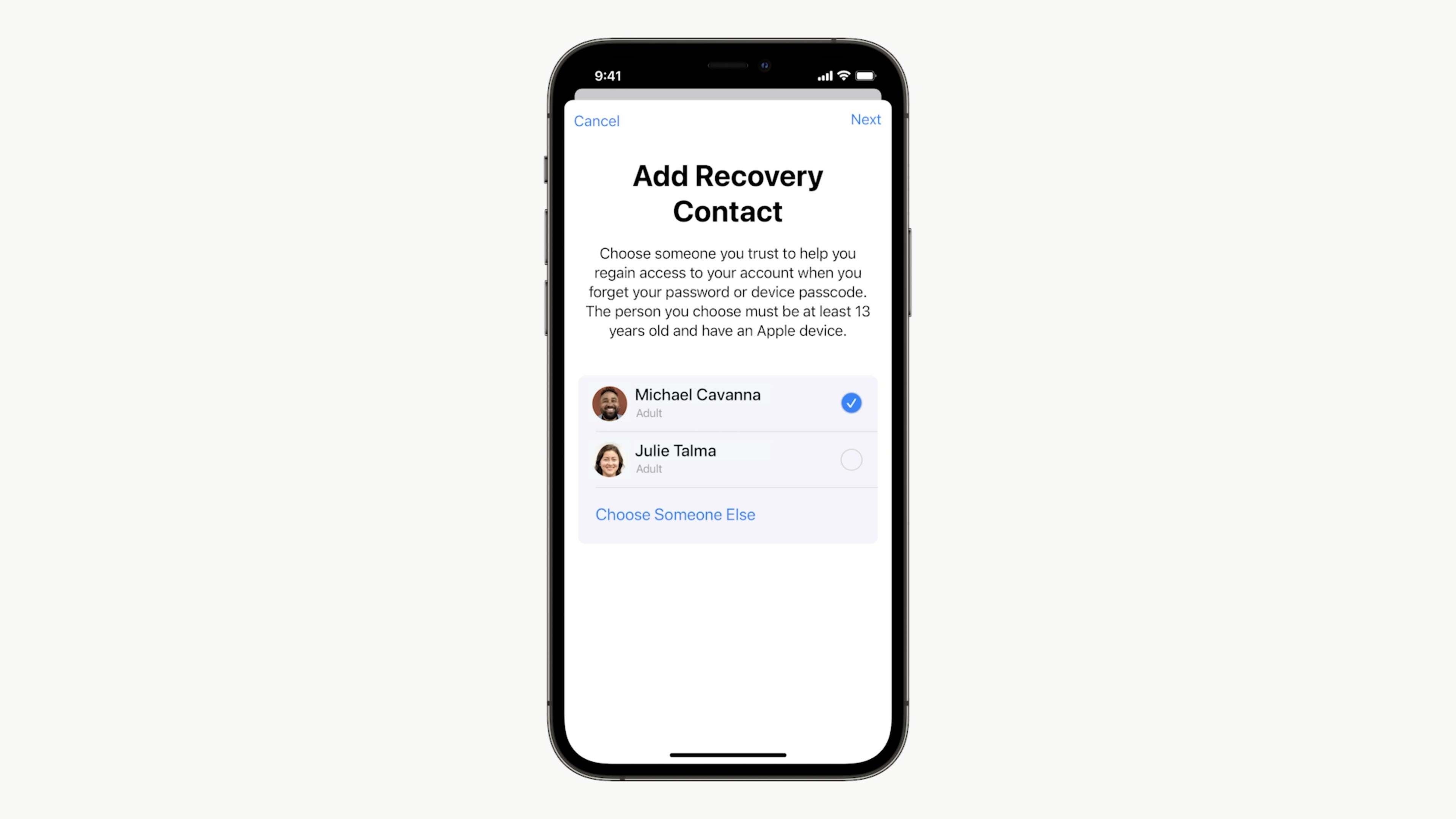
Open the Settings app and tap your name at the top of the screen. Next, select Password & Security > Account Recovery > Add Recovery Contact. A page will pop up detailing what exactly the contact can see or do with your account (Spoiler: They won’t have access to your iCloud account at any time), and briefly detail what you’ll need to do if you ever get locked out of your account. Tap Add Recovery Contact at the bottom of the screen to continue. Enter your Apple ID password when prompted, then follow the rest of the prompts to select your recovery contacts.
wwdc-2021-apple-315-icloud-plus.png
A Recovery Contact will be the key to unlocking your iCloud account or Apple ID if you forget your password. Screenshot/Apple

What to do if you get locked out of your Apple ID or iCloud account

If you happen to get locked out of your account, you’ll need to call one of your Account Recovery Contacts using your iPhone. Your contact will then give you a short code they can access directly on their iPhone, which you’ll then need to enter in order to unlock your account.  

Once your account is unlocked, you’ll be asked to create a new password. Instead of leaving it to your memory, or picking an easy password you think you’ll remember, I suggest using a password manager app. It’ll create a secure password for you, save it, and even enter it when prompted. 

There are a lot of great features in iOS 15, including the addition of sending FaceTime links for calls on Android and Windows. The AirPods are also getting plenty of useful tricks, along with the Apple Watch. 

Source: CNET

Related Posts

Emerging media professionals urged to embrace AI as future of journalism

Emerging media professionals urged to embrace AI as future of journalism

August 23, 2026
18
Ghanaian Journalists Urged To Treat Cybersecurity As Editorial Safety

Ghanaian Journalists Urged To Treat Cybersecurity As Editorial Safety

August 22, 2026
9
Previous Post

McBrown’s husband reveals the amount he receives as ‘salary’ for playing the role of manager

Next Post

Prez Akufo-Addo gives Hearts of Oak GH₵1m boost for Confed Cup

Related Posts

Emerging media professionals urged to embrace AI as future of journalism
News

Emerging media professionals urged to embrace AI as future of journalism

August 23, 2026
18
Ghanaian Journalists Urged To Treat Cybersecurity As Editorial Safety
Technology

Ghanaian Journalists Urged To Treat Cybersecurity As Editorial Safety

August 22, 2026
9
From Adoption To Ownership” – AI Advocate Urges Africans To Control AI Tools
Technology

From Adoption To Ownership” – AI Advocate Urges Africans To Control AI Tools

August 16, 2026
7
Renowned journalist Bismark Brown joins 2026 ERAI Fellowship
Technology

Renowned journalist Bismark Brown joins 2026 ERAI Fellowship

July 8, 2026
8
Meta CEO Zukerberg testifies in court over child social media addition trial
Technology

Meta CEO Zukerberg testifies in court over child social media addition trial

February 19, 2026
9
Ghana places first order for Airbus helicopters
News

Ghana places first order for Airbus helicopters

January 15, 2026
20
Next Post
Prez Akufo-Addo gives Hearts of Oak GH₵1m boost for Confed Cup

Prez Akufo-Addo gives Hearts of Oak GH₵1m boost for Confed Cup

Leave a Reply Cancel reply

Your email address will not be published. Required fields are marked *

BROWSE BY CATEGORIES

  • Business
  • Education
  • Entertainment
  • Foreign
  • Health
  • Lifestyle
  • News
  • Opinion
  • Politics
  • Sports
  • Technology
  • Uncategorized

BROWSE BY TOPICS

AFCON Afghanistan AI akufo addo Amazon apple AT&T Ato Forson Black Stars covid COVID-19 E-Levy facebook galamsey Ghana Ghana music Ghana Police Service Google Government health Highlife Intel iphone Majority meta Microsoft Minority momo NDC NPP Oluman Buggie OMICRON Parliament police President John Dramani Mahama Russia security South Africa tech Tesla Top Media Group US UTAG vaccine World Cup

Recent Posts

  • Kudus has the qualities to play at any top club in Europe – Dede Ayew
  • Emerging media professionals urged to embrace AI as future of journalism
  • Ghanaian Rapper Strongman Teams Up with Hiplife Veteran Tinny on “Yaanom”
  • Ghanaian Journalists Urged To Treat Cybersecurity As Editorial Safety
  • Maame Serwaa celebrates 20 years in movie industry with stunning photos

Recent Comments

  1. meinestadtkleinanzeigen.de on (Photos) GNFS Suppress Fire At Lakeside Estate Apartment
  2. News on Church Of Pentecost Commission 35 Bed AI Powered Hospital In Bolgatanga (Photos)

RECENT NEWS

  • Kudus has the qualities to play at any top club in Europe – Dede Ayew August 24, 2026
  • Emerging media professionals urged to embrace AI as future of journalism August 23, 2026
  • Ghanaian Rapper Strongman Teams Up with Hiplife Veteran Tinny on “Yaanom” August 22, 2026
  • Ghanaian Journalists Urged To Treat Cybersecurity As Editorial Safety August 22, 2026

MAIN CATEGORIES

  • Business
  • Education
  • Entertainment
  • Foreign
  • Health
  • Lifestyle
  • News
  • Opinion
  • Politics
  • Sports
  • Technology
  • Uncategorized

Entertainment

Office Day: picking the right shoes and outfit that set you apart from the rest
Health

Office Day: picking the right shoes and outfit that set you apart from the rest

2 weeks ago
8
  • ABOUT US
  • CONTACT
  • ADVERTISE

© 2025 Top Media Group - Powered by BackUP Data Systems

No Result
View All Result
  • Home
  • Politics
  • News
  • Business
  • Health
  • Entertainment
  • Sports
  • Lifestyle
  • Education
  • Opinion

© 2025 Top Media Group - Powered by BackUP Data Systems

Welcome Back!

Login to your account below

Forgotten Password?

Retrieve your password

Please enter your username or email address to reset your password.

Log In